
A house in the browser
An interactive 3D model I use to learn 3D on the web.
Overview
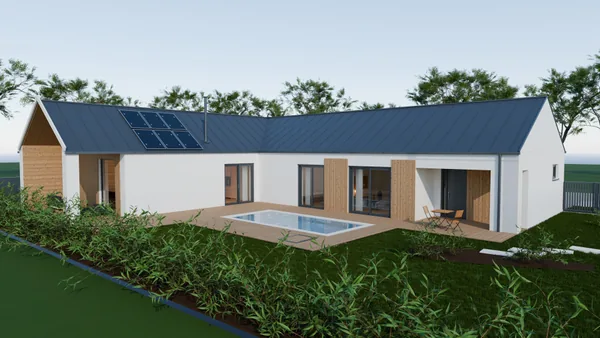
An evening project: a model of a house you can walk through directly in a browser. Geometry, interior and garden all come from a shared data model. The house I am building is the subject, but the project is mostly about what I learn on it.
Scope
- Interactive 3D model in the browser
- Data model for geometry and dimensions
- Interior, collisions and walkthrough
- Visualisations in Blender
01 /Context
This project started as an exercise. I wanted to find out how much a 3D scene in a browser can carry, and for that I needed a subject I know well — the house I am also working on.
It is not client work and not a product. It is a place where I can try things without a client and without a deadline, which is exactly why I learn the most on it.
02 /My role and responsibilities
I develop the model and the entire web scene myself: geometry, materials, camera controls, the interior walkthrough and the payload size at which the scene still loads reasonably.
The subject is the house I am building, so I work with real dimensions. The model then feeds back into the design — it helps me think about space and the relationships between its parts.
03 /Key decisions
A space you can walk through
The model can be rotated, flown around or entered. It includes an interior, working doors and collisions, so I can experience the space from the perspective of someone walking through it.
One data model
Geometry, dimensions and technical views come from the same data. A change in one place propagates through the whole scene instead of having to be tracked down by hand.
A practice ground with no deadline
The project deliberately has no client and no deadline. I can try approaches I would adopt more cautiously in paid work, and carry forward only what proved out.
04 /Architecture
I develop the interactive model in TypeScript with Babylon.js. Geometry, dimensions and technical views are based on a shared data model.
Blender and Cycles build on the web scene to produce visualisations. Prepared 3D models and materials return to the browser, which retains rotation, flyover and walking through the interior.
05 /Technology
Babylon.js, TypeScript, React, Blender, Cycles, glTF
06 /Outcome
The model can be explored directly in a browser: orbiting, flyover and walking through the interior and the garden. The link always leads to its currently published version.
I keep working on it. What I learn there about 3D on the web, performance and working with data I also use outside this project.